ServiceTitan Support
ServiceTitan admin and follow-up support for home service teams buried in updates.
Home service companies using ServiceTitan can outsource routine admin work only after the process is documented. Remote Partners AI helps turn queue rules, note formats, status boundaries, follow-up timing, and escalation triggers into a teachable workflow for Cebu-based support agents. Pricing, warranty, payment, dispatch-sensitive, and unclear job decisions stay with your internal team.
Admin queues Callback lists Estimate follow-up QA review
Admin workflow visual
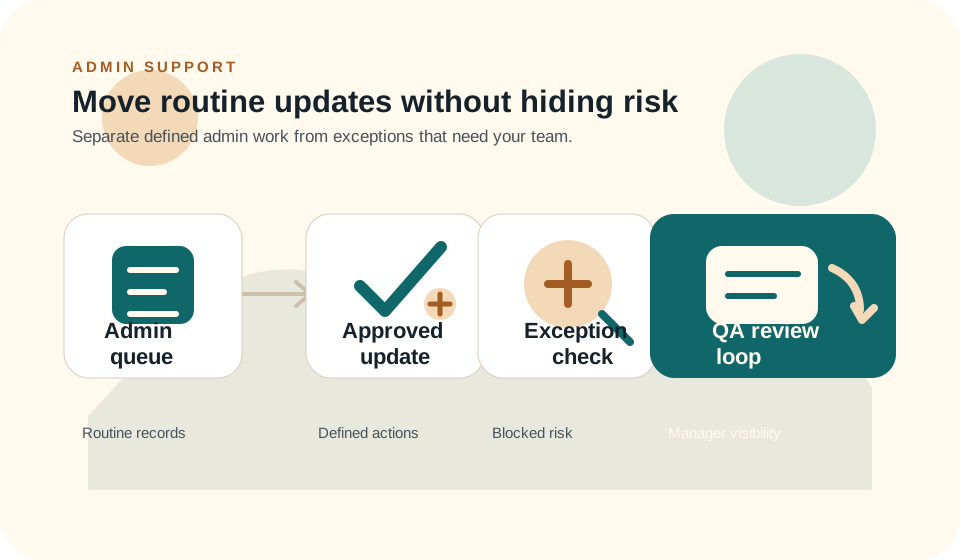
How ServiceTitan admin support moves from queue to reviewed update
The visual path keeps the page honest: routine admin can move, but exceptions and sensitive updates still route to the internal team.
Audit the ServiceTitan queue reality
Review which queues stall, which fields are inconsistent, which note formats cause rework, and which updates dispatchers do not want agents to touch.
Write the update boundaries
Define safe actions, note templates, approved customer language, required fields, blocked actions, and escalation triggers before training starts.
Train agents on the exact workflow
Use the documented process to build training modules, scenario checks, sample records, and QA examples before agents work live records.
QA the records, not just the volume
Check whether notes are usable, fields are complete, customer language is approved, blocked actions were avoided, and exceptions reached the right person.
Outcome Notes, callbacks, estimates, and customer updates move with clearer review and escalation boundaries.
Admin Buyer Pressure
Where ServiceTitan follow-up usually starts breaking.
Home service teams often have the system they need. The failure point is usually ownership: queues are unclear, notes are inconsistent, follow-up rules live in one dispatcher's head, and exceptions are not separated from routine admin work.
The software is not the bottleneck; the follow-through is
Home service teams may have the right system but still fall behind on notes, callbacks, updates, and follow-up ownership.
Dispatchers should not carry every admin task
When dispatch, phones, customer updates, and admin cleanup all land on the same people, important follow-up starts to slip.
Incomplete notes make tomorrow harder
Poorly documented calls, job updates, and customer requests create rework for dispatchers, managers, and technicians.
Exceptions need a clear stop sign
Pricing disputes, warranty questions, refunds, VIP accounts, and unclear job status changes should not be handled like routine admin.
Support Scope
What the admin support team can help handle.
This service should start with documented, reviewable work. It is not a shortcut for unsupported integration claims, certified partner claims, or decisions that should stay with dispatch, finance, management, or ownership.
- Work from an approved ServiceTitan SOP that defines queues, fields, note style, and update authority.
- Clean up routine admin queues where the next action is documented and reviewable.
- Enter or prepare notes using the format your dispatchers, managers, and technicians expect.
- Draft approved customer messages for routine status checks, reminders, and follow-up windows.
- Flag records that need pricing, warranty, payment, dispatch, or manager review before action.
- Use AI to help draft SOPs, summarize queue patterns, create training checks, and support QA review.
Launch Path
How to start without turning admin support into hidden risk.
Start by making the admin workflow teachable. Once safe fields, note rules, blocked actions, and escalation triggers are clear, agents can train against the workflow before the workflow expands.
Step 1
Audit the ServiceTitan queue reality
Review which queues stall, which fields are inconsistent, which note formats cause rework, and which updates dispatchers do not want agents to touch.
Step 2
Write the update boundaries
Define safe actions, note templates, approved customer language, required fields, blocked actions, and escalation triggers before training starts.
Step 3
Train agents on the exact workflow
Use the documented process to build training modules, scenario checks, sample records, and QA examples before agents work live records.
Step 4
QA the records, not just the volume
Check whether notes are usable, fields are complete, customer language is approved, blocked actions were avoided, and exceptions reached the right person.
Tool Context
Where this support workflow touches your daily operation.
The useful work is not just answering more contacts. It is knowing which systems, fields, notes, and handoffs make the next internal step easier.
ServiceTitan queues and records
The safe workflow starts with queues where the next action, field rules, note format, and blocked actions are documented.
Approved customer language
Agents should only send or draft messages that match approved wording for reminders, status checks, follow-up windows, and callback requests.
Manager review and blocked actions
Pricing, warranty, payment, dispatch-sensitive updates, and unclear job-status changes need an internal stop sign before any record changes.
Case Scenario
Estimate follow-up backlog without unsafe record changes
A ServiceTitan team has open estimates, incomplete notes, and callback tasks sitting behind live dispatch work. Dispatchers want help, but not at the cost of risky updates.
- Agents work from a queue list that defines which records are safe to review.
- Routine follow-up notes and approved customer messages are drafted or entered using the documented format.
- Pricing, warranty, payment, dispatch, VIP, or unclear records are flagged for internal review.
- QA checks field completeness, note usefulness, blocked-action compliance, and escalation timing.
Result:The admin queue moves without pretending outsourced support is a ServiceTitan integration, certified partner, or replacement for dispatcher judgment.
Comparison
How ServiceTitan admin support compares with common alternatives.
The alternative is rarely software versus people. Most teams already own the software; the issue is documented follow-through.
Dispatcher-owned admin
Best for judgment, costly for focus
Dispatchers understand the context, but admin queues can steal time from live calls, schedule decisions, and technician coordination.
Generic VA tasking
Best for simple backlog cleanup
Generic admin help can move tasks, but ServiceTitan work needs blocked actions, note standards, approved language, and QA.
Remote Partners AI
Best for reviewable admin support
Agents handle routine queue work inside documented boundaries while risky updates escalate before action.
Related Services
The ServiceTitan page connects back to real support services.
Admin support works best when follow-up, call handling, QA, and escalation are part of the same managed support model instead of a loose queue-cleanup task.
Back Office
Back-Office Follow-Up Support
Work the approved ServiceTitan admin workflow: note cleanup, routine status preparation, follow-up reminders, and exception flags.
Calls and Dispatch
Call Answering and Dispatch Support
Use phone support when ServiceTitan queues are fed by callbacks, quote intake, appointment questions, or customer update requests.
QA and Escalation
QA, Escalation, and Workflow Control
Review ServiceTitan records for safe update authority, required fields, blocked actions, approved messages, and escalation notes.
FAQ
ServiceTitan admin support questions.
Is Remote Partners AI a ServiceTitan integration or certified partner?
No formal integration, certification, or partner claim should be made unless it is verified. This service is trained admin and follow-up support inside your documented ServiceTitan workflow.
What ServiceTitan work can be outsourced first?
Start with the queue work that already has a clear rule: records that need clean notes, approved customer language, routine next-step preparation, or review-ready admin cleanup. Do not start with work that requires pricing judgment, dispatch authority, warranty decisions, payments, or unclear customer promises.
What ServiceTitan work should stay internal?
Pricing decisions, warranty exceptions, refunds, dispatch-sensitive changes, VIP accounts, payment questions, and unclear job status updates should stay with your internal team or escalate for review.
Where does AI help with ServiceTitan admin support?
AI helps before and after the live work: drafting SOPs, turning process notes into training modules, creating scenario tests, summarizing queue patterns, and helping QA reviewers find missed fields or risky updates. Trained agents still execute the work, and managers still own approval and escalation.
Can agents change job status or dispatch details?
Only if the exact action is documented, approved, and reviewable. Anything that affects technician scheduling, customer expectations, safety, pricing, or warranty should stay internal or escalate.
What should be included in a ServiceTitan admin SOP?
The SOP should define queue ownership, allowed fields, note style, approved messages, blocked actions, escalation triggers, review cadence, and examples of records agents should not touch.
Next Step
Want to know which ServiceTitan admin workflow should move first?
Bring us the queue that keeps getting stale, the records your dispatchers distrust, or the admin handoff that lives in one person's head. We will help map the safest first workflow.